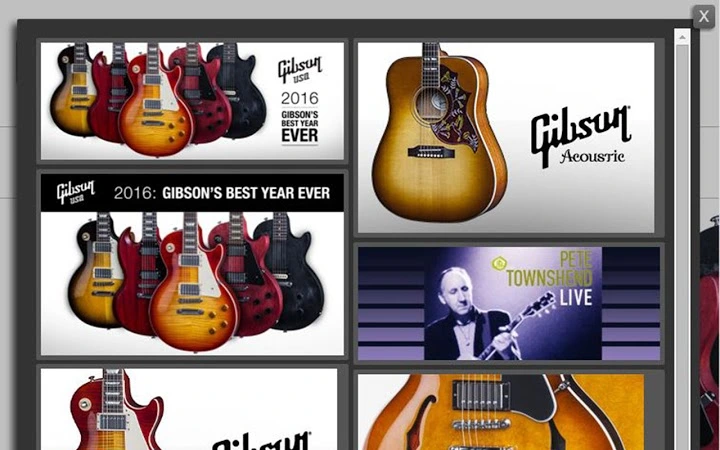

Lightweight Image Gallery for Forums
Overview
Galleryzer is a browser extension designed to transform image-heavy web pages—particularly forum threads—into clean, organized image galleries. By automatically detecting and displaying only images that meet a user-defined size threshold, the tool helps eliminate irrelevant visuals such as headers, banners, and small icons. This functionality is especially useful for users navigating content-rich forums where multiple images are shared in posts. The extension operates directly within the browser, requiring no additional setup or external dependencies.
Targeted at casual users, forum enthusiasts, and content curators, Galleryzer streamlines image browsing by presenting media in a visually appealing, responsive layout. Its lightweight nature ensures minimal impact on browser performance. The developer, Mikko Lakomaa, has emphasized privacy and security, with no analytics, ads, or third-party libraries used. The tool supports both light and dark themes, and includes a built-in lightbox for full-size image viewing. Real-world use cases include reviewing image threads on Reddit, image-sharing communities, or technical discussion boards where visual content is central to the conversation.
Key Features & Capabilities
- Smart Image Filtering – Only displays images above a user-defined size threshold, avoiding clutter from small or irrelevant visuals like banners and icons.
- Responsive Gallery Layout – Automatically adjusts to 2–4 columns based on the browser window size, ensuring optimal viewing across devices.
- Duplicate Image Detection – Checks image sources to prevent multiple instances of the same image from appearing, ideal for threads where images are quoted multiple times.
- Light and Dark Theme Support – Offers visual customization to suit user preferences and reduce eye strain during extended browsing sessions.
- Lightbox Integration – Enables full-size image viewing with smooth transitions and support for links to larger image versions.
- Forum Navigation Support – Displays navigation elements from the original forum on top of the gallery, helping users move between threads or pages.
- Keyboard Shortcuts – Provides customizable shortcuts for common actions, enhancing efficiency for power users.
- Privacy-First Design – Operates without external libraries, analytics, or advertising, ensuring user data remains secure.
These features work together to create a seamless experience when reviewing image-heavy content. For example, a user browsing a photography forum can quickly generate a gallery of all high-resolution images in a thread, view them in a clean layout, and access full-size versions without leaving the page. The duplicate detection ensures that repeated images aren’t displayed multiple times, improving clarity and reducing load time.
User Interface, Workflow & Performance
The user interface of Galleryzer is minimal and focused, appearing as a toolbar or overlay when activated. It integrates directly into the webpage, overlaying the existing content with a gallery layout. Navigation within the gallery is intuitive, with thumbnails arranged in a responsive grid. The lightbox feature activates with a single click, providing a distraction-free view of the selected image.
Workflow efficiency is enhanced by the automatic detection of eligible images and the ability to enable the gallery with a single action. The extension’s lightweight design means it consumes minimal system resources, though exact performance metrics were not specified. The developer did not provide additional system requirements or resource usage details. Stability is expected to be high, given the absence of third-party libraries and external dependencies. General software behavior patterns suggest low CPU and RAM usage during operation.
Compatibility & System Requirements
Galleryzer is compatible with Windows, Mac, and Linux operating systems. It is designed as a browser extension, supporting major browsers through standard extension platforms. The extension size is 1.2 MB, indicating a compact footprint. The software version is 2.1.0, released on March 15, 2024.
Exact system requirements were not listed. Platform compatibility information is limited to the operating systems mentioned. No specific hardware requirements were provided. The extension does not require additional software or runtime environments to function. Installation is straightforward, relying on the browser’s extension management system.
Pros and Cons
Pros
- Lightweight and fast, with no external dependencies
- Smart filtering prevents irrelevant images from appearing
- Responsive layout adapts to screen size automatically
- Supports both light and dark themes for better accessibility
- Eliminates duplicate images across multiple posts
- Includes a built-in lightbox for full-size viewing
- Privacy-focused—no ads, no analytics, no third-party scripts
- Supports forum navigation within the gallery
Cons
- Only available as a browser extension, not a standalone desktop app
- Requires user-defined size threshold for filtering
- Forum navigation support may not work on all websites
- Keyboard shortcut functionality may require manual configuration
- Developer has not provided detailed documentation or tutorials
FAQ Section
Is Galleryzer compatible with all web browsers?
Galleryzer is designed for major browsers via standard extension platforms. Compatibility may vary depending on the browser and its extension policies. Support for Windows, Mac, and Linux is confirmed.
Does Galleryzer collect user data or track browsing activity?
No, the extension operates without analytics, tracking, or third-party scripts. It is built with privacy in mind and does not collect or transmit user data.
Can I use Galleryzer offline?
Yes, once installed, the extension functions without an internet connection. However, it requires an active webpage with images to generate a gallery.
How do I update Galleryzer to the latest version?
Updates are managed automatically through the browser’s extension store. Users should ensure their browser is set to auto-update extensions for the latest version.
Is Galleryzer free to use?
Yes, Galleryzer is free and released under a Creative Commons Attribution + Non-Commercial license. It does not require a subscription or payment.
Final Thoughts
Galleryzer stands out as a focused, privacy-conscious tool for anyone who frequently browses image-heavy forum threads. Its ability to filter, organize, and display images in a clean, responsive layout makes it a valuable addition to any web user’s toolkit. The inclusion of duplicate detection, lightbox support, and forum navigation enhances usability significantly. While limited to browser extension use, its lightweight design and strong privacy stance make it a reliable choice for users who value performance and data security.
For forum enthusiasts, content reviewers, and casual image browsers, Galleryzer delivers a seamless and efficient experience. Its smart filtering and clean interface eliminate clutter and improve focus. The developer’s commitment to minimalism and user privacy sets a high standard for browser tools.
Download Galleryzer now







